WK4DS Amateur Radio Blog
Search Posts

Ten-Tec Scout 555 POTA Activation: 26 Contacts in 15 Minutes CW & SSB Setup Guide
Looking for a reliable POTA activation setup? Here's my complete guide to activating parks using the Ten-Tec Scout 555 transceiver. In this activation, I made 26 SSB contacts in just 15 minutes, plus worked several stations on CW using ham stick antennas and portable power. Whether you're new to Parks on the Air or looking for equipment ideas, this post covers my portable ham radio setup, antenna tuning tips, and real-world activation results.
Looking for a reliable POTA activation setup? Here's my complete guide to activating parks using the Ten-Tec Scout 555 transceiver. In this activation, I made 26 SSB contacts in just 15 minutes, plus worked several stations on CW using ham stick antennas and portable power. Whether you're new to Parks on the Air or looking for equipment ideas, this post covers my portable ham radio setup, antenna tuning tips, and real-world activation results.
My Ten-Tec Scout 555 POTA Equipment Setup
My setup process has gotten pretty streamlined over the years. I pull into the parking spot, grab the Scout case and antenna bag from the truck bed, and I'm usually on the air within 15 minutes. First thing I do is get the hamsticks mounted and run the radials - usually just two per antenna is enough for POTA work. While those are getting situated, I'll set up the radio in the truck cab, connect power, and do a quick SWR check with the nanoVNA. If the SWR is under 2:1 I'm happy enough to start making contacts. The key is keeping it simple - I've learned the hard way that complicated setups mean more things that can go wrong in the field. Harbor Freight cases have been a game changer for organizing everything too. Everything has a place and I can just grab the case and go.
Today saw me use the Ten Tec Scout again to great effect. Below is the case I carry it in showing the full compliment of band modules (I keep one in the radio and today that is the 20 meter module). Under the radio is the power cable in a pocket just for it and next is the spot for the microphone in a more permanent role. You can see the impression from where it sits in the case currently. This Ten-Tec Scout 555 POTA activation demonstrates why this radio is popular for portable ham radio operations.
These hard cases come from Harbor Freight and make wonderful travel cases for my POTA radios to be quite honest about it. I need to get two more and kit out my Ten Tec Argonaut 5 and my Penntek TR-35 and the set will be complete. The Argonaut has a nice hard case, but it is really large and kinda hard to maneuver with. I thought it would be a great kit for POTA and it does work, but I would really like something different… As an aside, I store the owners manual to each radio behind the lid foam on all of these. That way I have a instruction book should I forget how to do something obscure that I dont use all that often.

My Ten-Tec Scout 555 travel case showing all band modules for POTA activations

Scout 555 band modules - simple to swap for different frequencies during activation
I have not dismantled a band module to see what all is inside it but there is a good bit of stuff going on in each one. They are about 3” long and the circuit board goes all the way to the front. So there is plenty of widgets inside them to make the magic happen.
Today, I only used the 15 and 20 meter modules as I was being a little lazy and only put out radials for these two ham sticks. A quick SWR check with the nanoVNA and I was off to the races.
N3ZN straight key with Picokeyer adding memory functions for CW POTA activations
POTA CW Equipment: N3ZN Key and Picokeyer Setup
The above shows my CW key and keyer. The key is made by N3ZN and if you have not tried one then I highly recommend them. It works beautifully for me. The keyer is a Picokeyer from Hamgadgets.com and works way better than it should for what it costs. Since Ten Tec radios traditionally dont have memories for the CW keyers, this is the way to have those memories really easily. For Parks on the Air activations, having a portable CW key with and a electronic keyer with memory functions is essential (at least to me it is…).
Operating SSB on POTA: Hand Mic and Voice Contacts
The next thing I did that was out of my usual character is to get the hand mic out and work some SSB today as well. It worked OK, but there were times when the audio was odd and I would get little hints to something being wrong but all in all it worked fine.

Hand mic for SSB operation - made 26 contacts in 15 minutes with this setup

Quick SWR check with nanoVNA before starting the POTA activation
Choosing a POTA Activation Location
When I scout out parks for POTA activations, I'm looking for a few key things. First, low RF noise is critical - no nearby power lines, businesses with switching power supplies, or heavy traffic. This park checked all those boxes and then some. The parking lot being empty is a huge bonus as it means no ignition noise from cars starting up or idling nearby. I also look for parks that allow me to set up antennas without disturbing other visitors. Some parks get really busy on weekends, so I'll often activate during weekdays or early mornings. Having good cell coverage helps too, though it's not required - I like being able to spot myself on POTA.app without relying solely on the Reverse Beacon Network. This particular spot has become one of my go-to locations because it's quiet, accessible, and the park staff are friendly to hams.
As per my usual outings, I had the place to myself today with only a couple of cars rolling by during the entirety of my activation. I like it like this though as there is no ignition noise to deal with or inverters making RF hash, just the peace and quiet of the park and my radio chattering in the truck. During this time of day, the sun will beam into my door if I roll down the window beside me so I usually just roll down the other three and the one beside me just a little so the air still moves through the truck taking away the heat from the radio and making it nice and pleasant.
Just look at that parking lot all for me! HaHa! That never gets old! There is just something magical about the peace and quiet of a park like this.

Perfect POTA location - empty park means no ignition noise or RF interference
Ten-Tec Scout 555 CW Operation Tips and Side Tone Settings
A few operating tips I've picked up over my POTA activations - start on CW if you can work it, as the Reverse Beacon Network will auto-spot you and save you from needing cell service. Once you've got 10 contacts in the log, switch modes or bands to see what else is happening. Don't be afraid to QSY (change frequency) if things go quiet. During this activation, moving from 15 meters to 20 meters made all the difference - 15 was fading out but 20 was on fire. When you get a pile-up like I did on SSB, just work them as fast as you can log them. Don't worry about being perfect, just get the call sign and signal report down. You can clean up the log later if needed. And always, always bring spare coax and adapters. Murphy's Law is real in the field!
Something I learned today that is different between the Argonaut 5 and the Scout is that I have to use the key jack to make this radio transmit a side tone in CW. I can key the transmitter with the “mic jack cable” that I made for the Argonaut 5 but it wont produce a side tone with the Scout for some reason. So I instead used this port on the back of the radio to get it to work right (see photo below). Another special thing about this radio to me is that it has a Curtis keyer chip in it and you can plug a set of paddles directly into it and it will work as you would expect, but it is in a different port… Go figure. All these options are hot all the time too. Plug a straight key into it and key it to send CW then you could (theoretically) just pick up the microphone and talk to someone on SSB without changing anything else on the radio. It appears that it is in SSB mode all the time and CW is just the side tone being transmitted instead of the audio from the microphone. This does cause one little issue that a user will notice pretty quickly. The zero beat is the display frequency plus or minus (depending on band) the side tone frequency. The filter is simply a bandpass knob that adjust the filter bandwidth and that is it. A very simple radio that just works.
An example of the side tone offset in CW can been seen in the photo above where I am tuned up on 15 meters. It displays 21.0523mhz but the radio is actually operating on 21.053mhz when transmitting. So if you are near the band edges on say 40 meters CW, just keep this in mind so you are not transmitting out of band. The owners manual even mentions this to make sure you stay compliant with FCC regulations.

CW key jack on Scout 555 back panel - required for proper side tone in CW mode

First page of activation log - starting on 15 meters CW and SSB

20 meter SSB pile-up - 26 contacts in just 15 minutes!

Final page showing all contacts from the activation
POTA Activation Results: 26 Contacts in 15 Minutes
As you can see from the log above, I started out on 15 meters CW and worked several stations there before moving to 15 meters SSB till the band essentially faded out. At that point I decided to see what would happen if I went down to 20 meters SSB and called CQ… Well the log speaks for itself. I made 26 contacts in 15 minutes! This has to be some sort of world record!!! LOL…for me that is… It was wild how big the pile up was and how quick it happened! The people were super nice and courteous and really helpful so I thank all of you that called me this day and I really appreciate you stopping by to say hello! This POTA activation shows what's possible with a simple portable ham radio setup."
Frequently Asked Questions About POTA Activations
What equipment do I need for a POTA activation?
For a basic POTA activation, you need a portable ham radio transceiver (like the Ten-Tec Scout 555, Icom IC705, or the like), an antenna (ham sticks work great for portable use), a power source (battery or vehicle power), some interconnect cabling such as coax and things like that, and a way to log contacts. Optional but very helpful equipment includes: a CW key for Morse code operation, a portable table or chair for comfort, an antenna analyzer like the nanoVNA for precise tuning, and a keyer with memory functions for repetitive CW exchanges. The beauty of POTA is you can start simple and add equipment as you learn what works for your operating style.
How many contacts do you need for a valid POTA activation?
You need a minimum of 10 QSOs (contacts) for a valid Parks on the Air activation. These contacts can be made on any amateur radio band and any mode - CW (Morse code), SSB (voice), or digital modes like PSK31 or FT8. Park-to-park contacts (when you work another station who is also activating a park) count double for hunters, but still count as just one contact toward your activation total of 10. Remember VHF and UHF contacts count too as long as they are simplex only.
What is the best radio for POTA activations?
The "best" POTA radio depends on your operating style and preferences. The Ten-Tec Scout 555 is excellent for CW operation thanks to its clean receiver, simple design, and reliable performance. Other popular choices among POTA activators include the Yaesu FT-891 for 100-watt capability, the Elecraft KX2 or KX3 for QRP portable operation, and the Icom IC-705 for all-mode including VHF/UHF. Choose based on your preferred operating modes, power requirements, portability needs, and budget.
How do you tune a ham stick antenna for POTA?
The easiest way to tune a ham stick antenna is with an antenna analyzer like the nanoVNA, or you can use your radio's built-in SWR meter. Start by adjusting the length of the whip section - make it longer to lower the frequency, shorter to raise it. Make small adjustments (just a fractions of an inch at a time) and recheck your SWR reading. For POTA activations, an SWR under 2:1 is generally acceptable and will work fine, though under 1.5:1 is ideal for maximum power transfer. Anything under 2:1 will not damage your radio though so don’t stress too much over this part.
Can you operate POTA from inside your vehicle?
Yes! Parks on the Air rules allow operation from inside your vehicle, which is different from SOTA (Summits on the Air) that requires outdoor setup away from vehicles. Operating from inside your car or truck is actually quite common during POTA activations, especially in bad weather, extreme temperatures, or when dealing with insects. As long as you and your entire station are physically located within the park boundaries, you're good to go. Just make sure you're parked in an authorized area.
What is the best band for POTA activations?
20 meters is often the most productive band for POTA activations because it provides a good mix of both local and DX (long distance) contacts throughout the day. 40 meters works exceptionally well for regional and NVIS contacts, especially in the early morning and evening. 15 and 10 meters can produce excellent DX contacts when conditions are right and solar activity is favorable. Many experienced POTA activators work multiple bands during a single activation to maximize their contact count and variety. In my activation with the Scout 555, 20 meters SSB produced 26 contacts in just 15 minutes - that's the power of picking the right band at the right time!
Whether you're new to Parks on the Air or an experienced POTA activator, the Scout 555 makes for an excellent field radio.
Have you tried POTA with a Ten-Tec Scout? Share your activation stories in the comments below! If you're planning your first Parks on the Air activation and have questions about equipment setup, feel free to ask.
Want more POTA content?Subscribe to my ham radio blog for more activation reports, equipment reviews, and portable operating tips.
---
## POTA Activation Summary
Equipment Used:
- Radio: Ten-Tec Scout 555 (50 watts)
- Antenna: Ham sticks on 15m and 20m with tuned radials
- Power: Vehicle electrical system
- CW Key: N3ZN paddle key with Picokeyer
- Microphone: Ten-Tec hand mic
- Accessories: NanoVNA for antenna tuning, Harbor Freight case
Operating Details:
- Bands Worked: 15 meters and 20 meters
- Modes Used: CW and SSB
- Total Contacts: 30+ QSOs
- Best Run: 26 contacts in 15 minutes on 20m SSB (that was wild!)
- Setup Time: Approximately 15 minutes from arrival to first contact
- Activation Duration: About 90 minutes total
Key Takeaways:
The Scout 555 continues to prove itself as a solid POTA radio. Simple, reliable, and the receiver is clean even with nearby RFI sources. The band module system makes it easy to swap bands, though it's not as fast as just turning a knob. The big lesson today was remembering which key jack to use for proper CW sidetone - small details like that can save you troubleshooting time in the field. Also, 20 meters SSB was absolutely on fire today - sometimes you just catch the band at the right time and everything clicks.
---
You can help support this website by using these Amazon Affiliate Links:
QRP/Portable Radios:
Antennas & Tuning:
CW Equipment:
Power & Accessories:
Organization & Transport:
BONUS ITEMS
73, WK4DS - David

Rainy day CW POTA is the best...for me.
When I set out to activate a park today, I didn’t know where, but rather, only how I wanted to do it. I have been using FT8 so much lately that I got to missing my little CW only radios.
When I set out to activate a park today, I didn’t know where, but rather, only how I wanted to do it. I have been using FT8 so much lately that I got to missing my little CW only radios.
The Penntek TR-35 CW QRP radio is perfect for POTA
Today saw the re-emergence of the Penntek TR-35 and all the little widgets I made to go with it. I really love this little radio and now I have built an actual travel kit around it so if I wanted to take it somewhere on a plane, the kit will fit in my carry on baggage.
The travel kit doesn’t include the s-meter module or power pack/speaker, but those are “luxuries” anyway. The kit does have everything needed to get the radio on the air and making contacts and that is all that it has. Anyway, let’s get to today!
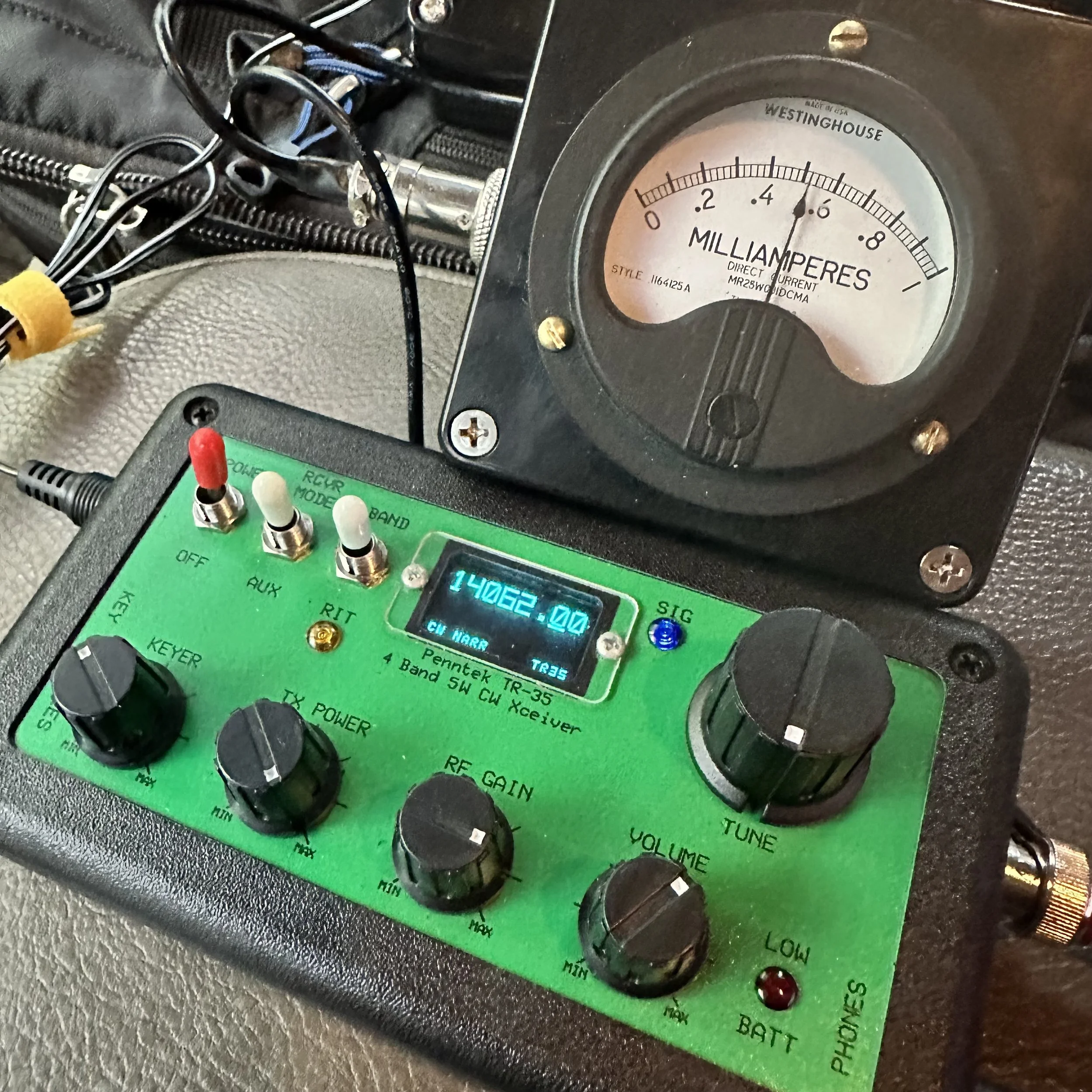
Pictured above is the radio and the “S meter” I built to go along with it. This meter works really well and makes using the radio just a little more fun for me. Is it needed? No, not at all, but that isn’t the point. This needle bouncing around while I copy code somehow is soothing for some reason and I can see how strong the signal is visually as well. I wrote about how I built in in this blog post.
Another thing of note is that this tiny little N6ARA key works REALLY well. Way better than something this simple should work… It actually works so well that it is worth using as a regular key. It is that good. Now to be fair, I dont know what the life of the key would be as it is PC board material so the contact thickness isn’t that much, but these keys do work really well. It takes a while to get it dialed in (read that as adjusted to your sending feel and style) but once you do, it is amazing how well it works. I should have gotten the larger variant, but I had this silly idea about minimalism and because of this, I got the little one.

Getting the key adjusted correctly and then some practice using it and this thing is amazing. Take it from me, if your not super concerned with every gram of weight, then get the bigger unit. It gives you so much more to hold onto that it isn’t even a option for me now. I still have the small one, but I do plan at some point to get the larger case for it.


Getting a spot on the POTA website
I posted this screen shot, of my spot on the POTA website, because I wanted to thank David- WA2OTC for going to the trouble of spotting me on the website while I was at the park without good cellular signal. He even came back to me and let me know that he had gotten the spot on there before moving on with his hunt. Thank you David!
It was really nice to not have to worry about getting on the website and getting myself spotted. You are probably thinking, then how did you get the screen shot? Well, I didn’t have a total black out, but just weak signal, so I simply loaded up the website and waited the 5 minutes or so for it to populate (seriously, I thought it would never load) so I could grab a screen shot for the blog. It would update EVER SO SLOWLY if I left it on the page. This location is a geographical oddity, it is close to the city but in a particular spot where there is terrible cellular coverage for some reason.

Welcome to fall and winter in the south. I have realized over the years that we get most of our water in the winter and I have planned accordingly. Things like the tape on the coax connector below to keep the rain out during an activation… Don’t forget to keep a roll of electrical tape in your car. Another trick I learned in working electrical maintenance over the years is that if you wrap the tape inside out (sticky side to the outside) then it wont leave residue on the cable and it works just as well for this purpose. We used it on factory motor connections so the rubber insulating tape would not stick to the connectors and it make changing the motors so much easier.
This exact weather event is what drove me to build the truck-tenna mount and figure out a power source for inside the truck cab to start with. POTA in the rain can still be fun as long as you plan for it.
The Inside-Out Electrical Tape Trick (From 20 Years of Electrical Maintenance)
I learned this trick working electrical maintenance over the years and it's perfect for POTA rain operations. The standard method that most people use is wrapping electrical tape with the sticky side to the connector, and this works fine for permanent installations where you're never going to take it apart again. But here's the problem for POTA: it leaves sticky residue when you remove it, it attracts dirt and moisture over time, and it's a pain to clean off in the field when you're trying to pack up and get home!
The inside-out method is way better for portable operations. You wrap the tape sticky side OUT, which sounds completely backwards but hear me out! The first wrap still sticks to itself even though it's reversed. It forms a perfect… well, close enough… waterproof barrier just like normal tape would. But here's the magic: when you peel it off after the activation, there's no residue on your connector! You can do this multiple times without any sticky buildup.
So how did I learn this? We used it on factory motor connections in industrial settings so the rubber insulating tape would not stick to the connectors and it made changing the motors so much easier. Motors would run for years in dusty, dirty environments and when it came time to replace them, the tape would peel right off without leaving any mess behind. The connectors underneath would be clean and ready to reconnect immediately.
For ham radio applications, I wrap coax connectors sticky-side-out, cover BNC connections between the radio and coax, and protect any exposed metal from rain. It works perfectly! Here's the actual process: Connect your coax normally first. Start the tape wrap with the sticky side facing OUT (this feels weird at first!). Wrap it around the connector 2-3 times, overlapping each wrap by about half. Press the tape to itself as you go so it forms a good seal. And that's it! You're done and it's completely waterproof…for a little while (long enough to complete the activation).
After the activation when you're packing up, peel off the tape and toss it in the trash.
Just like the tape on the coax connector below to keep the rain out during an activation... Don't forget to keep a roll of electrical tape in your car! This simple trick has saved countless activations from rain-related failures. I'm serious about always having a roll in the truck because you never know when weather is going to change on you!


Another thing that has happened at this location is that someone has cleaned it up… I am guessing the park service since there were chainsaws used…a lot. The cut all of the dead trees out as well as cleaned up all the dead-fall and then mowed the entire site! This is the first time I have seen this happen since doing POTA! The photo below was take just a month or so back.

The Joy of CW-Only Operations
There's something special about CW-only rigs like the Penntek TR-35 that's hard to explain until you've actually used one for a while.
The first thing you notice is there's no mode confusion. It's CW and that's it! You don't sit there thinking "should I try SSB instead?" or "maybe FT8 would work better in these conditions?" You just do CW all the time and you stop second-guessing yourself. That simplification is actually really freeing!
This leads to simplified operating in general. There are fewer controls to fiddle with. There's no mic gain to adjust, no audio levels to mess with(other then the obvious AF Gain knob for your headphones), no VOX settings or anything like that. It's just frequency and volume and you're done. You send code, you receive code, and that's the entire operating experience. No menus, no submenus, no functions buried three levels deep in software!
Here's something I didn't expect when I first started using CW-only radios: it actually forces you to improve! You can't fall back on voice modes if CW is hard. You actually have to learn the code better. You have to build your speed and confidence because there's no other option. And you know what? This makes you a better CW operator! When you go back to radios that have multiple modes, your CW skills are way better than they were before.
There's also this Zen quality to CW that's hard to describe. The rhythmic sending and receiving, the meditative quality of copying code, the direct brain-to-brain communication without any voice involved... it's pure information transfer! No misunderstood words, no voice characteristics, just the message itself getting through. I know that sounds kind of woo-woo but it's real!
After using FT8 (which is great!), phone modes (also great!), and other digital modes (all great!), sometimes I just want the simplicity of CW. One mode, one band (20 meters on the TR-35 is a good safe bet), one purpose which is to make contacts! No computer required, no sound card interface, no USB cables, no software updates. Just the radio, the key, and propagation.
This is exactly why today's activation was so satisfying for me. No menus to navigate, no mode switching to think about, no computer to set up and troubleshoot. Just me, the key, the radio, and the other operators on the other end. Simple! And after almost an hour of non-stop contacts, I realized this is what I really love about ham radio. The simplicity and the direct connection to other people through Morse code. I really love this little radio!

So after getting the radio setup and checked for SWR, I hopped on 20 meters right away. I wanted to be sure to get the activation fairly quickly as I didn’t a long time to stay and I also was using my Penntek TR-35 radio which is QRP power too. This gives me the best possible chances at activating…well, I underestimated the capability of the radio a little as you can see from the log. LOL. I first hunted AC4BT to just see if I could get through, this is because lot’s of activators today use 100 watt radios so just listening to the other stations no longer gives you an idea of how strong your signal will be. I make my point with the signal reaport I got back. He was booming into my radio and I was a 339 to him. 339 is workable so I moved to a clear spot, called QRL a few times, then called CQ and that is when things took off!

For almost the next hour, the bands were on fire! The only time there was a significant time between contacts was when I tried to reply to KM3STU and couldn’t get him. He came in strong and then vanished. Shoot, at one point I worked Germany! He was closer to the noise than the other stations but I was able to dig his call out after a minute. It is ALWAYS awesome to work another continent with a QRP radio!!! Alas, after about 45 minutes of non-stop contacts, the band just fell silent for me and after calling CQ for a few minutes, I called QRT and shut down the station as I needed to pack up anyway. This was a great POTA activation for me and one where I look back fondly at how much fun a tiny little radio can be.
I will say it again, if you have thought about activating a park, just do it. If you have hunted, then you know the exchange. Just write the park number at the top of the page for when you work another activator and the want to exchange park numbers with you. You can see that I paper log in the field then enter it into a computer when I get home to submit it to the POTA site so the hunters get credit. I will be honest here, if the hunters didn’t get credit for the contacts as well, I wouldn’t bother uploading the logs at all. For me it is about the experience and not the awards, this is why I have never submitted anything for awards from any organization. I just like operating on the air. So those logs upload are for you, not me… you see, without the hunter, this would not be a huge hobby like it is today, so I want them to get the credit they deserve. Anyway I will stop rambling and until next time, get your radio out and talk to someone on it!
Frequently Asked Questions About CW POTA and QRP Operations
Can you do POTA activations in the rain?
Absolutely! POTA in the rain can still be fun as long as you plan for it. This is exactly what drove me to build the truck-tenna mount and figure out a power source for inside the truck cab to start with. Here's what you need:
Waterproofing:
Electrical tape on coax connectors (keeps rain out!)
Pro tip: Wrap the tape inside out (sticky side to the outside) so it won't leave residue on the cable and it works just as well
Keep a roll of electrical tape in your car at all times
I learned this trick working electrical maintenance over the years
Operating from the vehicle:
Truck-tenna (receiver hitch) mount lets you operate from inside
Power source in the cab (battery or power supply)
Stay dry and comfortable
Still counts as a valid POTA activation as the whole station is inside the park boundry.
Welcome to fall and winter in the south! We get most of our water in the winter, so I've planned accordingly. Don't let weather stop you from activating parks!
What is QRP and why do you use it for POTA?
QRP means low power operation, typically 5 watts or less. My Penntek TR-35 is a QRP radio, and honestly? I love using it for POTA! Here's why:
Why QRP is awesome:
Small, lightweight radios (easy to carry)
Lower power consumption (batteries last longer)
Challenge and satisfaction (you worked them with 5 watts!)
Proves propagation is good (if you can get through at QRP, conditions are solid)
Fun factor (there's something special about making DX contacts on 5 watts!)
Reality check: The signal report I got from AC4BT was 339 (readable but weak). But you know what? It's workable! I hunted him first just to see if I could get through, because lots of activators today use 100-watt radios so just listening to other stations no longer gives you an idea of how strong your signal will be. At one point I worked Germany with this little radio! It is ALWAYS awesome to work another continent with a QRP radio!!!
QRP isn't for everyone, but if you enjoy the challenge and the simplicity of small radios, it's incredibly rewarding!
What's the advantage of CW over voice or digital modes for POTA?
CW (Morse code) has some real advantages for POTA activations:
Narrow bandwidth:
Gets through noise better than voice
Can copy weak signals that would be unreadable on SSB
Works in poor conditions
Lower power required:
QRP CW is more effective than QRP voice
5 watts CW = 20+ watts SSB in terms of effectiveness
Better battery life
Faster exchanges:
CW POTA exchange can be quick and efficient
Less time per contact = more contacts per activation
Usually people can make clean contacts in poor operating conditions with CW where voice would fail or require many repeats.
Personal preference: I have been using FT8 so much lately that I got to missing my little CW only radios! There's something meditative about copying code and sending with a straight key. The rhythm, the simplicity, the direct connection to the other operator. It's just fun!
That said, use whatever mode you enjoy! POTA is about getting on the air and having fun, whether that's CW, SSB, FT8, or anything else.
How do you activate a POTA park without good cellular signal?
This is a real challenge! At this particular location (a geographical oddity), I'm close to the city but in a spot where there's terrible cellular coverage for some reason. Here's how to handle it:
Before you leave:
Download offline maps of the park
Have your POTA park number written down
Know the exchange you'll use
Pre-plan your frequency and mode and schedule them on the POTA website ahead of time
At the park:
Self-spot if you can get any signal at all (even slow!)
Ask another station to spot you (like WA2OTC did for me!)
Just start calling CQ and hunters will find you eventually
The WA2OTC story: I wanted to thank David WA2OTC for going to the trouble of spotting me on the website while I was at the park without good cellular signal. He even came back to me and let me know that he had gotten the spot on there before moving on with his hunt. Thank you David! It was really nice to not have to worry about getting on the website and getting myself spotted.
Getting screenshots with weak signal: I didn't have a total blackout, but just weak signal, so I simply loaded up the website and waited the 5 minutes or so for it to populate (seriously, I thought it would never load) so I could grab a screenshot for the blog. It would update EVER SO SLOWLY if I left it on the page.
The ham radio community is great about helping activators get spotted. If you can't self-spot, just ask on frequency!
What is the Penntek TR-35 and why do you like it?
The Penntek TR-35 is a tiny QRP CW-only transceiver for 20 meters. It puts out about 5 watts and is incredibly simple. I really love this little radio! Here's why:
What makes it special:
CW only (no distractions, just Morse code)
20 meter monoband (one band, done well)
QRP power (5 watts, battery-friendly)
Small and portable (travel kit friendly)
Simple to operate (no menus, just tune and send)
My travel kit: Now I have built an actual travel kit around it so if I wanted to take it somewhere on a plane, the kit will fit in my carry-on baggage. The travel kit doesn't include the S-meter module or power pack/speaker, but those are "luxuries" anyway. The kit does have everything needed to get the radio on the air and making contacts and that is all that it has!
Real-world performance: For almost the next hour after I started calling CQ, the bands were on fire! I worked Germany! The only time there was significant time between contacts was when I tried to reply to KM3STU and couldn't get him. After about 45 minutes of non-stop contacts, the band just fell silent for me.
This was a great POTA activation and one where I look back fondly at how much fun a tiny little radio can be!
What is the N6ARA key and how well does it work?
The N6ARA key is a tiny straight key designed for portable operations. I have the small version, and honestly? This tiny little N6ARA key works REALLY well. Way better than something this simple should work!
Why it works:
Simple PCB construction (printed circuit board material)
Adjustable contacts and “spring” tension
Compact size (fits in tiny kits)
Surprisingly good feel when dialed in
The adjustment process: It takes a while to get it dialed in (read that as adjusted to your sending feel and style), but once you do, it is amazing how well it works! Getting the key adjusted correctly and then some practice using it and this thing is amazing.
My regret: I should have gotten the larger variant, but I had this silly idea about minimalism and because of this, I got the little one. Take it from me, if you're not super concerned with every gram of weight, then get the bigger unit. It gives you so much more to hold onto that it isn't even an option for me now. I still have the small one, but I do plan at some point to get the larger case for it.
Longevity question: To be fair, I don't know what the life of the key would be as it is PC board material so the contact thickness isn't that much, but these keys do work really well. It actually works so well that it is worth using as a regular key. It is that good!
Why did you build an S-meter for the Penntek TR-35?
The Penntek TR-35 doesn't come with an S-meter, and I wanted one! I built a simple S-meter module that works really well and makes using the radio just a little more fun for me. I wrote about how I built it in this blog post.
Is it needed? No, not at all, but that isn't the point! This needle bouncing around while I copy code somehow is soothing for some reason and I can see how strong the signal is visually as well.
Why I like it:
Visual feedback (see signal strength)
Satisfying to watch (needle bouncing with code)
Helps tune in weak signals
Just makes operating more enjoyable
It's one of those "luxuries" that isn't necessary but adds to the fun factor. And isn't that what ham radio is all about?
Should you upload your POTA logs even if you don't care about awards?
Yes! I will be honest here, if the hunters didn't get credit for the contacts as well, I wouldn't bother uploading the logs at all. For me it's about the experience and not the awards. This is why I have never submitted anything for awards from any organization. I just like operating on the air.
Why upload logs:
Hunters get credit for their contacts
Without the hunter, this wouldn't be a huge hobby like it is today
Those log uploads are for you, not me
It's the right thing to do for the community
My logging process: I paper log in the field then enter it into a computer when I get home to submit it to the POTA site so the hunters get credit. You can see my paper log in the photos!
I want hunters to get the credit they deserve. Without them, POTA wouldn't be what it is today!
What should a beginner know before attempting their first POTA activation?
Just do it! If you have thought about activating a park, just do it. Here's what you need to know:
If you've hunted, you already know the exchange:
Your callsign
Signal report
Park number (write it at the top of your log page)
If working another activator, exchange park numbers
Start simple:
Pick a mode you're comfortable with (CW, SSB, FT8, whatever!)
Bring a paper log (you can log electronically later)
Start on 20 meters (most activity)
Call CQ and see what happens!
Don't overthink it: I underestimated the capability of the radio a little as you can see from the log, LOL. I first hunted AC4BT just to see if I could get through, then moved to a clear spot, called QRL a few times, then called CQ and that is when things took off!
The hardest part is just getting started. Once you make that first contact, you'll realize it's not scary at all. It's fun!
What power source do you use for in-vehicle POTA operations?
I figured out a power source for inside the truck cab specifically for rainy day operations. Options include:
Battery options:
Bioenno LiFePO4 batteries (lightweight, efficient)
Sealed lead acid (cheaper but heavier)
Cigarette lighter adapter (if your vehicle supports it)
QRP advantage: Since the Penntek TR-35 only uses 5 watts, battery consumption is minimal. You can operate for hours on a small battery!
Rain operations: Having power inside the vehicle means you can operate comfortably in any weather. The truck-tenna mount lets me set up the antenna outside while I stay dry inside. POTA in the rain can still be fun as long as you plan for it!
BONUS QUESTION: What's your favorite part about POTA activations?
The experience! For me it's about the experience and not the awards. There's something special about:
Taking radios to beautiful parks
Making contacts from random locations
The challenge of QRP and CW
Meeting other operators on the air
Just being outside with radio gear
Today was a great POTA activation for me and one where I look back fondly at how much fun a tiny little radio can be. The bands were on fire, I worked Germany on 5 watts, and I spent almost an hour making contacts in the rain from my truck!
That's what ham radio should be: fun, challenging, and rewarding. So get your radio out and talk to someone on it!